Creating Product Storyboards for Engaging Social Media Ads
In today’s fast-paced digital world, audiences don’t watch ads — they scroll past them. To capture attention in just a few seconds, your visuals need to be sharp, strategic, and emotionally engaging. That’s exactly where product storyboarding becomes your most powerful creative tool.
Most brands make one critical mistake:
They start shooting without planning scenes, camera angles, transitions, or product placements — and end up spending more on reshoots than the actual advertisement cost.
If you want to save money, avoid production errors, and create high-performing social media ads, your first step must be simple: create a storyboard.
This blog will guide you through everything you need to craft engaging, cost-saving, high-ROI storyboards for your next ad campaign.
Understanding the Core Principles of Storyboarding for Social Media Ads
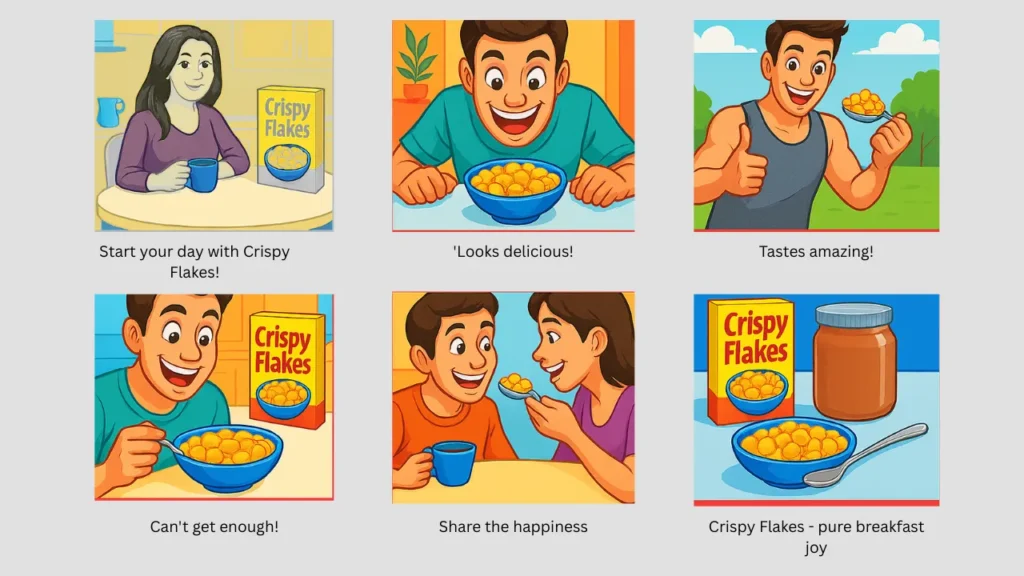
Advertisement Storyboarding is the visual blueprint of your marketing video. It breaks your ad into clear, easy-to-understand frames that show what happens in every scene — from camera angles and product positions to transitions and on-screen text.
The core principles include
- Clarity: Every frame must show what the viewer will see.
- Continuity: Characters, colors, and angles must stay consistent.
- Flow: Scenes must move smoothly from one to the next.
- Purpose: Every shot must support the marketing message.
On social media — where attention spans are at their lowest — this clarity becomes even more crucial.

Why You Should Storyboard Your Marketing Video Before Shooting Anything
If you think storyboards are optional, here’s the truth:
Skipping a storyboard is the most expensive mistake brands make.
Without proper planning:
- You will overshoot and waste time
- Your visuals may not match your script
- Camera angles may not highlight the product properly
- Scenes may look disjointed
- Editors may struggle to maintain flow
- Re-shoots will drain your budget
This is where storyboarding saves you.
If you are not aware of your scenes, camera angles, and frames before your social media ad shoot, you will end up spending more than your actual advertisement cost. A storyboard eliminates guesswork and gives you a clear roadmap.
The Cost of Not Planning: Why Brands Overspend on Social Media Video Production
Most creators and brands underestimate how expensive “mistakes” are during a shoot.
The biggest reason ads go over budget?
Starting production without a storyboard.
Without a storyboard, teams face:
Overshooting
You film more than necessary “just in case,” increasing time, energy, and storage costs.
Reshoots
When scenes don’t match the script or look poor in editing, you have to shoot again — doubling production costs.
Poor Camera Angles
Incorrect angles make the product look unappealing, forcing retakes.
Confusing Visual Flow
Editors struggle to build a story from random footage, leading to long editing hours.
Talent & Location Waste
Models, influencers, and studio time are expensive. Unplanned shoots extend this cost.
Inconsistent Lighting and Framing
This creates a low-quality final ad that may need another session to fix.
All of these problems vanish when you create a storyboard.
A storyboard gives you:
- A clear shot list
- Planned angles and movements
- Product-specific frames
- A logical visual sequence
- Team alignment before shooting
In simple terms:
If you want to avoid wasting budget on unnecessary footage or reshoots, online storyboarding is the smartest cost-saving step.
How Storyboarding Reduces Wasted Budget in Ad Production
Creating a storyboard helps you predict and fix mistakes before they happen in pre-production steps. Here’s how it saves production money:
- Prevents reshoots by clarifying what needs to be filmed
- Avoids overshooting because the shot list is already planned
- Aligns the creative team so photographers, models, and editors follow the same vision
- Optimizes location, props, and lighting to avoid last-minute changes
- Creates shot efficiency — every minute on set is productive
For small businesses and creators, this means producing high-quality ads without burning your marketing budget.
Essential Elements of a High-Impact Product Storyboard
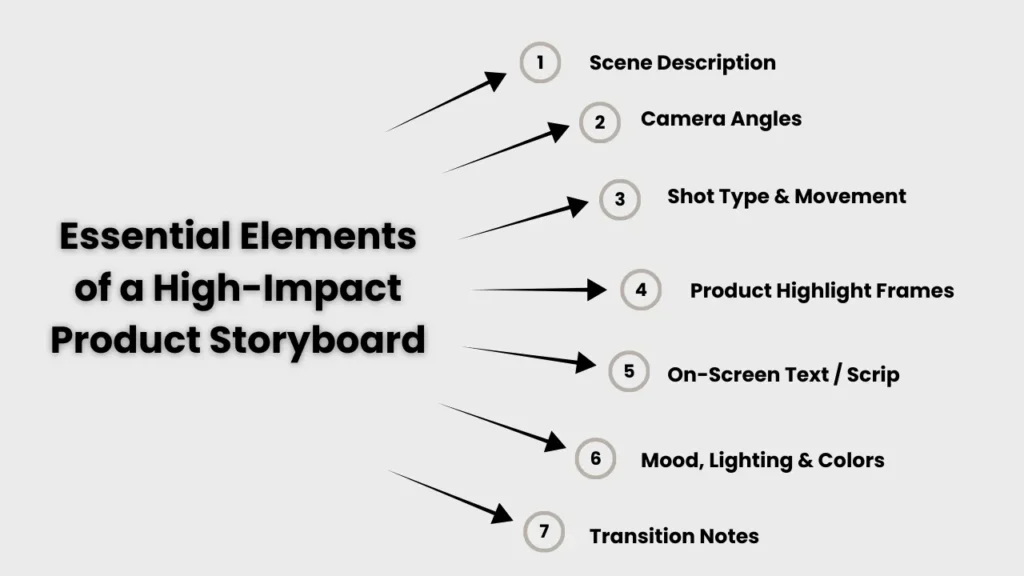
A powerful storyboard includes:
Scene Description
Explains what the viewer will see.
Camera Angles
Close-up, top-shot, wide frame, POV, product hero shot, etc.
Shot Type & Movement
Static, panning, zoom-in, slow motion, etc.
Product Highlight Frames
Key shots where the product is clearly visible.
On-Screen Text / Script
Captions, hooks, offers, and CTAs.
Mood, Lighting & Colors
Helps maintain visual consistency.
Transition Notes
Cut, fade, swipe, and zoom — especially important for reels and TikToks.
These elements combine to create a visually cohesive ad with maximum impact.
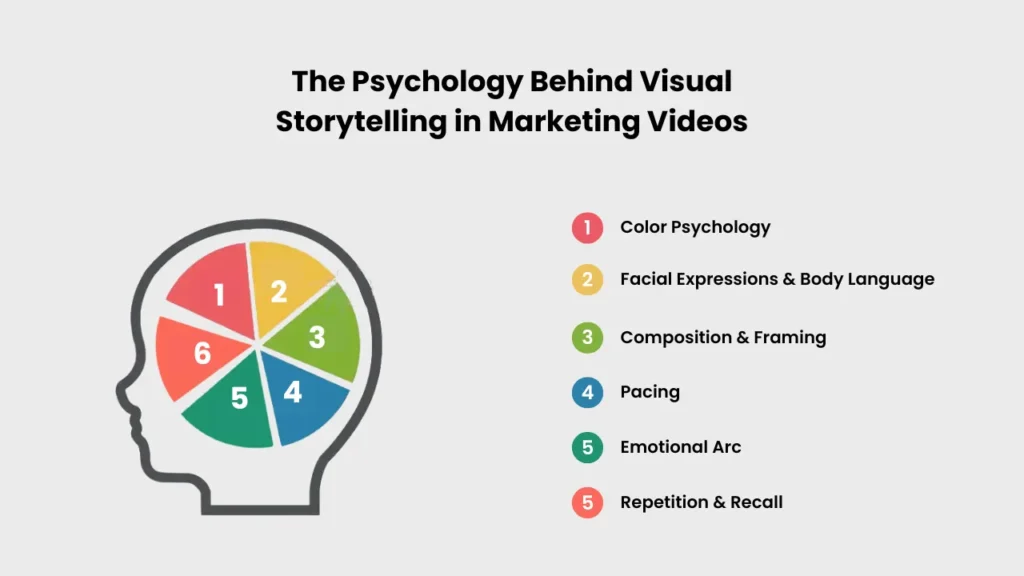
The Psychology Behind Visual Storytelling in Marketing Videos
Consumers don’t just buy products — they buy emotions, trust, and connection. Visual storytelling uses psychology to shape how viewers perceive your brand within seconds, and storyboarding helps you plan these elements with intention.
Color Psychology
- Warm colors → energy & excitement
- Cool colors → trust & calm
- Bold colors → confidence
The right color palette instantly boosts brand recall.
Facial Expressions & Body Language
A smile, reaction shot, or confident movement helps viewers feel emotionally connected to your message.
Composition & Framing
- Close-ups build trust
- Wide shots create lifestyle appeal
- POV shots increase involvement
Strong framing makes your ad feel more personal and persuasive.
Pacing
Fast pacing creates energy; slow pacing builds emotion.
Storyboarding helps you choose the right rhythm for your message.
Emotional Arc
Effective ads follow a simple structure: Problem → Discovery → Solution → Result.
Planning this arc ensures your ad triggers the right emotions at the right time.
Repetition & Recall
Showing the product multiple times strengthens familiarity and improves brand memory.
A well-planned storyboard ensures every psychological trigger is intentional – making your ad more persuasive, more memorable, and far more likely to convert viewers into buyers.
How Storyboarding Improves Ad Performance on Instagram, TikTok & YouTube Shorts
Short-form platforms like Instagram Reels, TikTok, and YouTube Shorts reward speed, clarity, and visual storytelling. Storyboarding helps creators design ads that match this fast-paced viewing style.
A clear storyboard forces you to plan:
- A strong 0–2 second hook (crucial for stopping the scroll)
- A vertical 9:16 composition that fits all platforms
- Transitions that feel natural (jump cuts, swipe cuts, zooms, POV)
- Short, impactful sequences instead of random shots
- Proper text placement so captions don’t clash with platform UI
- Visually clear product moments to improve ad recall
When you plan your ad frame-by-frame, you naturally remove dull moments and keep only what engages. This increases:
- Watch time
- Retention rate
- Engagement (likes, shares, comments)
- Click-through rate
- Conversion rate
In short, storyboarding transforms your ad from a “random video” into a platform-optimized, high-retention piece of content that performs significantly better across all social platforms.
Free vs. Paid Storyboarding Resources: What Should You Choose?
Storyboarding doesn’t have to be expensive. You can start for free.
Free Tools
Perfect for beginners:
Best for: small creators, freelancers, and new brands.
Paid Tools
Ideal for advanced creators:
Best for: agencies, production houses, and teams working on multiple campaigns.
Free or Paid — Which One Should You Choose?
Start with free tools if you’re learning or making simple social media ads.
Upgrade to paid tools when you need advanced controls like collaboration, shot lists, and AI storyboard automation.
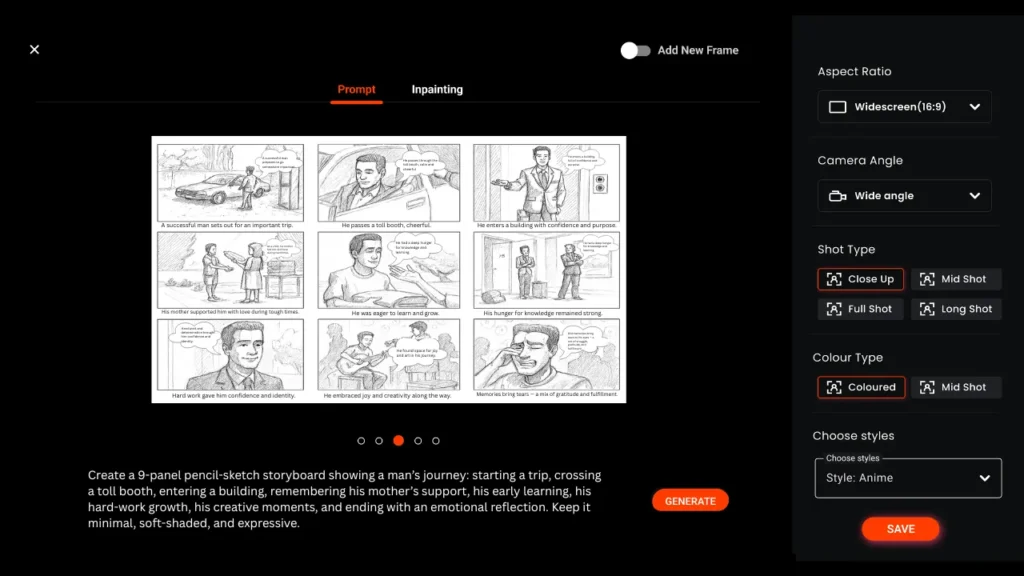
Advanced Techniques to Elevate Your Storyboarding for Social Media Ads
Want your ads to look highly professional? Use these advanced methods:
- AI storyboard generators for fast frame creation
- Shot sequencing for smoother narrative flow
- Platform-specific framing (9:16 vertical for reels/shorts)
- Emotion mapping to plan how the viewer should feel each second
- Multi-angle product shots to boost clarity
- Lighting consistency planning for premium look-and-feel
These techniques help your ads look like big-budget productions — even when your budget is small.
How to Adapt Storyboarding for Different Audiences
Different audience segments respond to different visuals. Adapt your storyboard based on:
Generation & Demographics
- Gen Z: fast cuts, bold text, trendy transitions
- Millennials: clean visuals, lifestyle-focused scenes
Buyer Intent
- First-time buyers: show benefits
- Repeat buyers: highlight new features
Platform Behavior
- Instagram: aesthetic visuals
- TikTok: fast-paced storytelling
- YouTube Shorts: educational + entertaining hooks
Adapting your storyboard ensures your message hits exactly where it matters.

Do’s and Don’ts of Storyboarding for Social Media Ads
Do’s
- Keep each frame simple
- Maintain character consistency
- Start with a strong hook
- Show product early
- Use vertical orientation
Don’ts
- Don’t clutter your frames
- Don’t change tones or colors suddenly
- Don’t ignore transitions
- Don’t create too many unnecessary scenes
- Don’t overcomplicate visuals
These rules keep your ad clean, clear, and conversion-friendly.
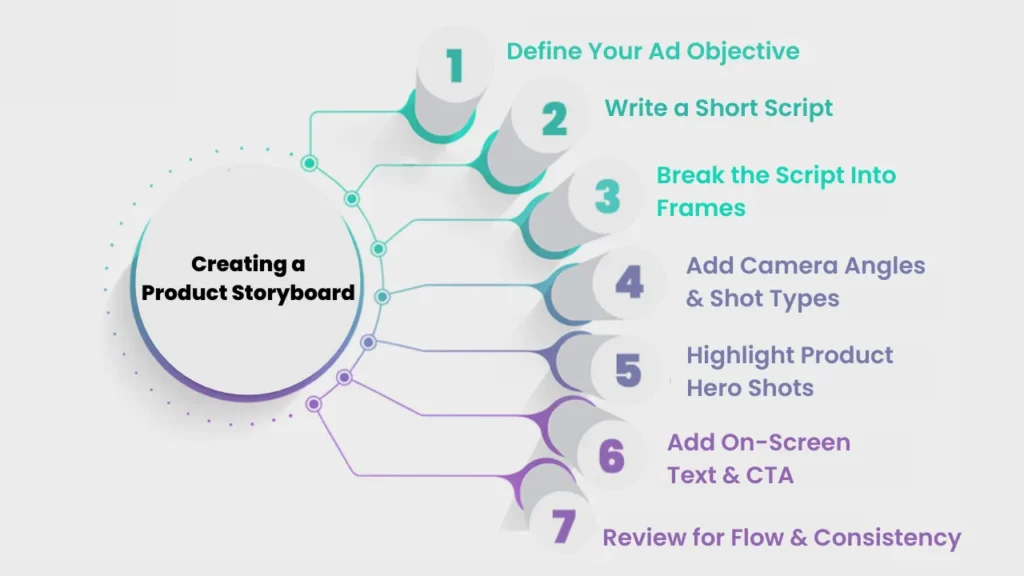
Step-by-Step Guide to Creating a Product Storyboard
Define Your Ad Objective
Decide whether your ad aims for awareness, sales, demo, or engagement.
A clear objective shapes your storyboard’s tone, visuals, and message.
Create a simple 5–30 second script with a hook, product moment, benefit, and CTA.
This helps you avoid random, unnecessary scenes.
Break the Script Into Frames
Convert each important moment into a separate frame.
Aim for 6-12 frames for a typical social media ad.
Add Camera Angles & Shot Types
Plan how each scene will look visually – close-up, top-shot, POV, wide shot, etc.
This ensures professional visuals and avoids reshoots.
Highlight Product Hero Shots
Show the product clearly within the first 2 seconds.
Include dedicated frames that focus on packaging, details, or usage.
Add On-Screen Text & CTA
Most viewers watch ads without sound.
Include hooks, benefit keywords, and a clear CTA like “Shop Now.”
Review for Flow & Consistency
Check for smooth transitions, consistent lighting, clear messaging, and correct pacing.
Remove any scene that doesn’t support your objective.
Conclusion: Storyboards = High-ROI, Low-Waste Social Media Ads
Great social media ads don’t happen by accident — they happen by planning.
A storyboard helps you:
- Save production costs
- Avoid reshoots
- Maintain visual consistency
- Increase engagement
- Communicate your message clearly
- Create ads that feel professional and conversion-driven
If you want your ads to perform better, convert more, and look more premium without increasing your budget, start with a storyboard every single time.
FAQs: What People Ask Most
1. Do I really need a storyboard for a 5- or 15-second social media ad?
Yes. Short ads need even tighter planning because every second counts. A storyboard helps you design a strong hook, clear messaging, and clean visuals.
2. What exactly should a storyboard include for a marketing video?
A good storyboard includes:
- Scene thumbnails
- Script or dialogue
- Camera angles
- Movements
- On-screen text/CTA
- Timing
- Notes for transitions, lighting, emotion
3. Should I write the script before or after creating the storyboard?
Write a simple script first. Then create the storyboard to visualize each line or moment. Both should support each other.
4. How do you plan camera angles and shot types in a storyboard?
Decide the angle based on your goal:
- Close-ups → show product details
- Medium shots → human interaction
- Wide shots → lifestyle context
- POV shots → immersive experience
Add arrows to show motion like zoom, pan, tilt, or movement.
5. What are the best free tools to create a storyboard for social media ads?
Free options include:
- Canva
- Murphy
- Storyboarder by Wonder Unit
- Figma
- Google Slides
- Adobe Express
6. Are paid storyboarding tools worth it — and which ones are good?
Yes, if you create ads often. Top paid tools:
- Boords
- FrameForge
- StudioBinder
- Storyboard Pro
They offer advanced features like asset libraries, timelines, and export options.
7. How long does it typically take to storyboard a social media ad?
- A simple 10–20 second ad takes 30–60 minutes.
- A detailed multi-scene ad takes 2–3 hours.
8. How much money can you save in production by using a storyboard?
You can save 30%–70% by preventing reshoots, overshooting, poor angles, and wasted time with models or locations.
9. Can you change your storyboard once filming has begun?
Yes, but only small adjustments. Major changes can cause delays or extra costs.
10.How do you storyboard for vertical video (Instagram Reels / TikTok)?
Use a 9:16 frame and plan:
- Centered subjects
- Space for captions and UI
- Taller compositions
- Faster cuts
11. What are common storyboard mistakes for social media ads?
- Too many unnecessary scenes
- No clear hook
- Missing camera angles
- Ignoring platform UI
- No CTA
- Weak product placement
12.What are advanced storyboarding techniques for social media ads?
- Split screens
- Match cuts
- Movement-based transitions
- Dynamic text animation planning
- Facial reaction sequencing
13. How do I storyboard ads for different platforms with different formats?
Create one core storyboard and adapt it into:
- 9:16 (Reels/TikTok/Shorts)
- 1:1 (Instagram feed)
- 16:9 (YouTube)
Keep the hook and CTA consistent.

