The Ultimate AV Script Template Guide (Free Template, Examples & Complete Breakdown)

Videos have become the fastest way to communicate ideas — whether for ads, corporate films, explainers, or YouTube content. But behind every polished video lies one essential planning tool: a well-structured AV Script Template.
An AV Script Template (Audio Visual Script Template) helps you organize visuals and audio side-by-side so teams, editors, animators, and clients stay perfectly aligned throughout the production process.
In this detailed guide, we’ll cover everything you need to know:
- AV script basics
- Why creators must use AV templates
- Murphy’s step-by-step audio-visual scripting workflow
- Detailed walkthrough of every script-writing step
- Real examples and samples
- Format types (Word, PDF, Docs)
- Best practices
- Free editable AV script template
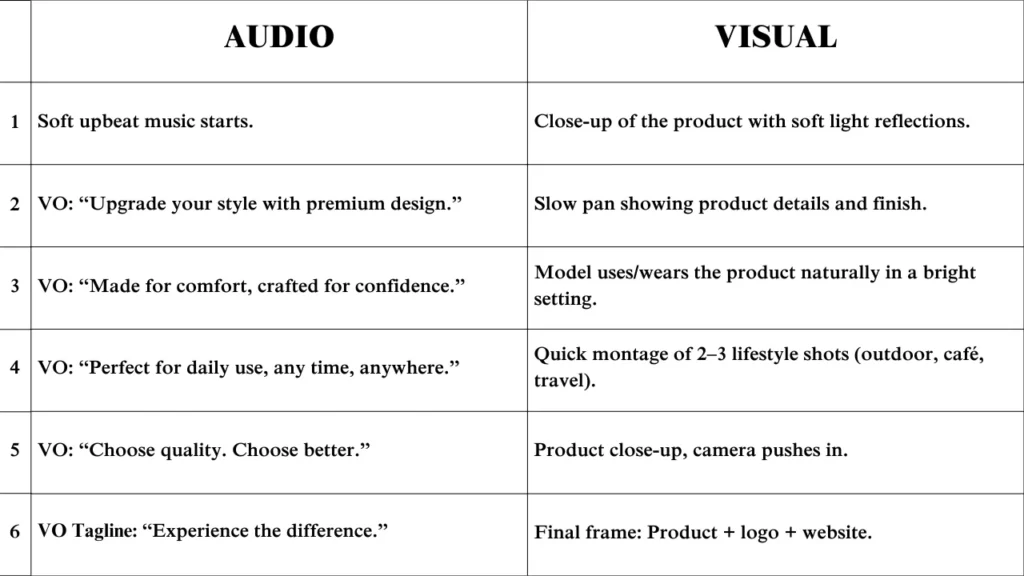
What Is an AV Script Template?
An AV Script Template is a two-column document that separates the audio elements and the visual elements of your video.
- Left Column → Audio
Includes:
- Narration
- Dialogue
- Background music
- Sound effects (SFX)
- Voiceover cues
- Right Column → Visuals
Includes:
- Shots and camera angles
- Scene descriptions
- Character actions
- On-screen text
- Transitions
- Animations
- Graphic elements
This structure ensures that your team clearly understands what viewers see and what viewers hear at the same moment. It reduces confusion, saves revision time, and ensures professional-quality output.

Why Every Creator Needs an Audio Visual Script Template
Using an audio visual script template is not optional — it’s essential. Here’s why:
Improves Communication
Writers, designers, editors, and clients stay aligned.
Everyone sees exactly what will happen on-screen.
Enables Faster Video Production
Since everything is planned, editors finish videos quicker.
Keeps Storytelling Clear and Structured
You know what happens in each scene without guessing.
Prevents Costly Mistakes
Clear instructions prevent reshoots or re-animations.
Ensures Brand Consistency
Especially for companies like Murphy, where quality and consistency matter.
How Murphy Uses AV Script Templates in Production
Murphy uses an Audio Visual Script Template as the foundation of every video — from short reels to complex brand films.
Here’s Murphy’s 8-step AV scripting workflow:
Step 1: Client Requirement Intake
Murphy’s creative team collects:
- Video purpose
- Target audience
- Tone & style
- Creative references
- Mandatory brand elements
This helps shape the script direction.
Step 2: Story Concept & Structure
Murphy develops:
- Core narrative
- Key message
- Scene flow
The AV script template acts as the skeleton for the video.
Step 3: Drafting Visual Flow
Before writing audio, Murphy’s team outlines:
- Scene order
- Camera movements
- Transitions
- Key moments
This becomes the visual column.
Step 4: Writing Audio Components
Then sound elements are added:
- Dialogue
- Voiceovers
- Music suggestions
- SFX
These fill the audio column.
Step 5: Refinement & Internal Review
The script is reviewed by:
- Creative director
- Storyboard artist
- Editor
- Client team
Step 6: Storyboard Development
The finalized AV script becomes the blueprint for storyboards.
Step 7: Animation / Filming
Teams follow the AV script to shoot or animate the scenes with precision.
Step 8: Final Delivery
Because everything was planned in the audio visupt template, the final output aligns perfectly with expectations.
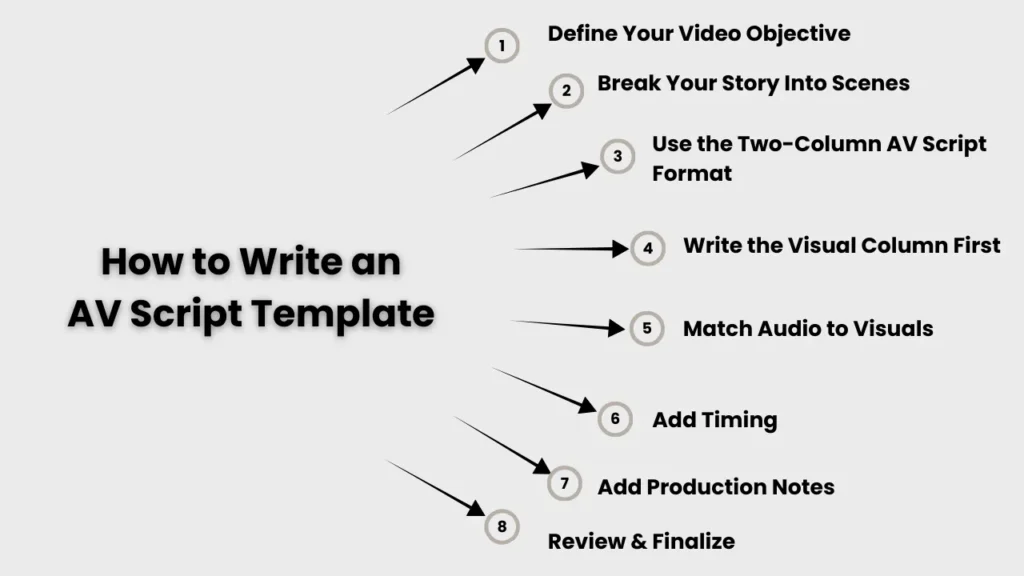
How to Write an AV Script Template (In-Depth Step-by-Step Guide)
Below is the most detailed, practical guide to writing an audio visual script.
Step 1: Define Your Video Objective
Before writing a single line, ask:
- What do I want viewers to understand?
- Who am I speaking to?
- What action should viewers take?
Example:
- For an explainer video → educate users
- For an advertisement → trigger desire or action
- For a corporate film → build trust
Your objective becomes the backbone of your AV script.
Step 2: Break Your Story Into Scenes
Every video — no matter how simple — must be divided into clear scenes.
Example structure:
- Intro
- Problem statement
- Solution
- Features
- Call to action
This helps in planning pacing and flow.
Step 3: Use the Two-Column AV Script Format
Your template should look like this:
| AUDIO (Left Column) | VISUAL (Right Column) |
|---|---|
| Narration | Scene description |
| Dialogue | Camera movement |
| Music | Graphics |
| SFX | On-screen text |
This is the global standard for professional video production.
Step 4: Write the Visual Column First
Most people make the mistake of writing audio first.
Murphy’s workflow always begins with visuals, because videos are visual stories.
Visual examples:
- “Close-up of product rotating slowly.”
- “Wide shot of office space with team working.”
- “Animated icons appear on screen.”
Step 5: Match Audio to Visuals
Now fill in the audio for each scene.
Audio examples:
- “Introducing the new Murphy AI Studio.”
- “Soft ambient music begins.”
- “Swoosh sound effect during transition.”
Make sure audio supports the visuals — not the other way around.
Step 6: Add Timing (Optional but Powerful)
Adding timing is extremely useful for editors and animators.
Example:
- Scene duration: 4 seconds
- VO duration: 3.5 seconds
This helps in maintaining pacing.
Step 7: Add Production Notes
This is the hidden section where you add:
- Editor’s notes
- Animation instructions
- Color references
- Transition styles
- Special effects
These notes help the team avoid confusion.
Step 8: Review & Finalize
Finally:
- Remove unnecessary words
- Ensure clarity
- Confirm visual-audio alignment
- Share with the team for feedback
Once approved, the AV script becomes the foundation of the storyboard.
Audio-Visual Script Examples (Explainer, Ad, YouTube, Corporate)
Here are detailed AV script examples:
Example 1: Explainer Video
| AUDIO | VISUAL |
|---|---|
| VO: “Meet Murphy — the smarter way to create videos.” | Logo reveal. |
| Soft ambient music begins. | Smooth fade-in animation. |
| Camera zooms into dashboard demo. |
Example 2: Product Ad
| AUDIO | VISUAL |
|---|---|
| Energetic music + swoosh SFX | Product close-up. |
| VO: “Make your brand unforgettable.” | Bright lighting. |
| Fast transitions synchronized to music. |
Example 3: Corporate Video
| AUDIO | VISUAL |
|---|---|
| “We believe in building creative excellence.” | Office workspace, team discussions, collaborative shots. |
| Calm corporate music. |
YouTube Tutorial Sample
| AUDIO | VISUAL |
|---|---|
| Step 1: Open your dashboard. | Screen recording appears with cursor animation. |
Instagram Reel Sample
| AUDIO | VISUAL |
|---|---|
| Upbeat track, quick VO | Bold text animation + fast-paced cuts |
Brand Awareness Sample
| AUDIO | VISUAL |
|---|---|
| Your ideas deserve the right execution. | Slow-motion shots + brand elements |
Best AV Script Template Formats (Word, PDF, Google Docs & Sheets)
1. AV Script Template Word
- Best for agencies and clients
- shareable
- editable
- formatting stays intact
2. Google Docs Template
- Perfect for teams
- real-time collaboration
- cloud storage
3. Excel / Google Sheets AV Template
- Ideal for longer videos
- easy timing columns
- flexible layout
4. PDF Version
- Best for final approvals
- non-editable
- locked formatting
Complete AV Script Template for Agencies
A professional agency-ready AV script includes:
- Title & project ID
- Duration & scene numbers
- Visual descriptions
- Audio cues
- Transitions
- On-screen text instructions
- Editor notes
- Animators notes
- Branding guidelines
- Review checklist
This ensures smooth workflow from scripting → storyboarding → production.

Best Practices for Writing Audio Visual Scripts
Do
- Keep lines short
- Write visuals in bullet points
- Use action verbs
- Add transitions
- Keep style consistent
Don’t
- Write paragraphs in the visual column
- Mix audio & visuals
- Skip key details
- Leave timing unclear
- Forget SFX or music notes

How AV Script Templates Improve Storyboarding Accuracy and Video Execution
An AV Script Template plays a crucial role in creating accurate, visually consistent, and production-ready storyboards. It acts as the bridge between written planning and visual execution, ensuring every creative and technical detail is correctly translated during the pre-production steps.
Here’s how an AV script directly improves storyboarding and final video quality:
Provides Clear Scene-by-Scene Direction
A structured AV script breaks the video into precise scenes, each with its own:
- Visual description
- Audio cues
- On-screen graphics
- Timing
This clarity allows storyboard artists, illustrators, or even an AI character maker to visualize each moment exactly as intended.
It eliminates guesswork and ensures every shot aligns with the narrative.
Helps Storyboard Artists Maintain Character Consistency
One of the biggest challenges in storyboarding is keeping characters consistent across frames.
With an AV script:
- You define character look
- Expressions
- Movements
- Positioning
- On-screen actions
When using tools like AI character maker or video storyboard maker, the AV script becomes the textual prompt reference to ensure every character looks identical in all panels.
Ensures Accurate Shot Planning for Animators & Editors
Your AV script includes shot details such as
- Camera angle
- Zoom
- Panning
- Transitions
- Scene duration
These instructions help storyboard artists create accurate frames and help editors during final execution.
It ensures that the video storyboard maker output aligns with the director’s vision.
Makes AI Tools for Filmmakers More Effective
Creators increasingly use AI tools for filmmakers like
- storyboard generators
- character builders
- animatic creators
- script interpreters
- shot planners
These tools depend on clear textual instructions.
A well-written audio visual script becomes the perfect input for:
- AI-based storyboard generation
- Movie script breakdown
- AI-assisted scene visualization
- Shot sequencing
Whether you’re using a movie script generator or an AI storyboard app, the AV script ensures AI produces consistent, accurate results.
Builds the Foundation for High-Quality Pre-Production
Every professional video follows essential pre-production steps, such as
- Concept development
- Scriptwriting
- AV scripting
- Storyboarding
- Shot planning
- Production design
AV scripting sits right at the center of this process.
It organizes ideas and makes sure storyboarding and later production run smoothly without confusion.
Ensures Perfect Execution During Filming or Animation
Because the AV script outlines:
- What happens
- When it happens
- How it should look
- What sound plays
- What text appears
- How characters move
Storyboards become far more accurate.
Directors, sound designers, editors, and animators can follow the visuals like a map.
This reduces:
- Retakes
- Redraws
- Re-renders
- Confusion during editing
- Wasted time and budget
It improves the quality and speed of the entire video pipeline.
Strengthens Collaboration Across Departments
Whether your team uses traditional tools or advanced AI tools for filmmakers, a clear AV script ensures everyone — writers, designers, storyboard artists, editors, and clients — understands the same vision.
This unified understanding makes storyboarding and final execution far more reliable.
FAQs: What People Ask Most
1. What is an AV script template?
It’s a two-column document that lists visuals on one side and audio on the other, helping you plan videos clearly and efficiently.
2. Why do I need an AV script?
It keeps your video organized, reduces mistakes, and ensures smooth execution—especially when using AI tools or storyboard makers.
3.How is an AV script different from a screenplay?
A screenplay tells the story; an AV script breaks every moment into clear audio and visual instructions for production.
4. What are the main parts of an AV script?
Visuals, audio, dialogues, camera notes, transitions, and timing cues.
5. How do I write good audio cues?
Be clear and specific—mention narration, dialogue, music, and sound effects with timing when needed.
6. How detailed should visual descriptions be?
Keep them clear and actionable—describe actions, camera frames, and mood for accurate storyboards.
7. How do I add timing in an AV script?
Add timestamps like 00:00–00:05 to guide editors and align with pre-production steps.
8. Can I write an AV script in Word or Docs?
Yes, but dedicated tools or AI storyboard makers make the process faster and more organized.
9. Are free AV script templates available?
Yes—many sites offer free templates in Word, Docs, and PDF formats
10.How do I convert an AV script into a storyboard?
Import each scene into a storyboard tool to turn script rows into visual frames.
11. Why is AV scripting important in pre-production?
It organizes visuals, audio, and timing—making storyboarding and filming more accurate.
12.How can AI help with AV scripts?
AI tools can generate dialogues, scene ideas, and layouts, saving time in scripting.
13.Common mistakes to avoid in AV scripting?
Vague visuals, unclear audio notes, no timing cues, and missing transitions.
14. Should I begin with visuals or audio?
Start with visuals for clarity, unless the project is dialogue-heavy.
15. How does a strong AV script improve video production?
It boosts accuracy, speeds up editing, and ensures the final video matches your vision.

